Installation and Configuration
Prerequisites
- IDE Version: Install Visual Studio Code 1.82.0 or later (Official Downloads).
- JDK Environment: Install JDK 11 or higher (Java Archive Downloads).
- Java Extension: Install the official Extension Pack for Java to support Java project builds.
- Access Requirements: Have your TocoAI Account ready (available via application on the official website).
Extension Installation
Currently, the extension is installed via a local package:
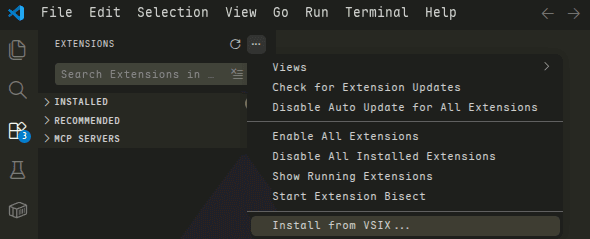
Install from VSIX
- Download: Obtain the latest
VS Code extensioninstallation package (.vsix** format)** from the TocoAI Official Website. - Install: Open the Extensions view in the Activity Bar ➔ Click the … (More Actions) icon in the top right ➔ Select Install from VSIX….
- Finish: Select the downloaded
.vsixfile in the file picker. It is recommended to restart the IDE after installation.
Account Login & Authentication
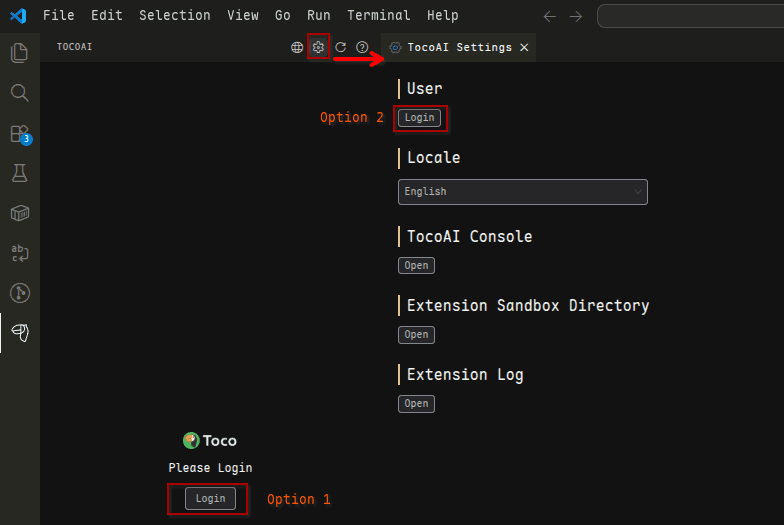
- Locate Settings: Click the TocoAI icon in the VS Code Activity Bar.
- Log In: Click “Login” and follow the prompts to complete authentication to enable AI capabilities.
Last updated on